Best WordPress Plugins for Earning Website (Complete Guide)

এই লেখায় যা আছে
- Introduction
- What You Will Learn
- Why Plugins Are Important for Earning Websites
- 1. Rank Math SEO (Best for SEO)
- 2. LiteSpeed Cache (Speed Booster)
- 3. WPForms (Contact Form)
- 4. Pretty Links (Affiliate Marketing)
- 5. Table of Contents Plugin
- 6. UpdraftPlus (Backup Plugin)
- 7. Elementor (Optional Page Builder)
- ❓ FAQ (SEO Optimized)
Introduction
After setting up your WordPress website with a good theme like GeneratePress, the next step is installing the right plugins.
But here’s where most beginners make mistakes:
👉 Installing too many plugins
👉 Choosing the wrong tools
👉 Slowing down their website
From my experience, using the right plugins can:
- Improve website speed
- Boost SEO rankings
- Increase AdSense approval chances
- Help you earn money faster
In this guide, I’ll show you the best WordPress plugins for earning websites, especially for beginners.
Recommended Guides
What You Will Learn
In this guide, you’ll discover:
- Must-have plugins for blogging
- SEO, speed, and security tools
- Monetization-friendly plugins
- Common mistakes to avoid
Why Plugins Are Important for Earning Websites
Plugins add extra features to your website without coding.
👉 For example:
- SEO plugin → helps rank on Google
- Cache plugin → makes site faster
- Form plugin → collect leads
👉 Without plugins, your site will stay basic
Must-Have WordPress Plugins for Beginners
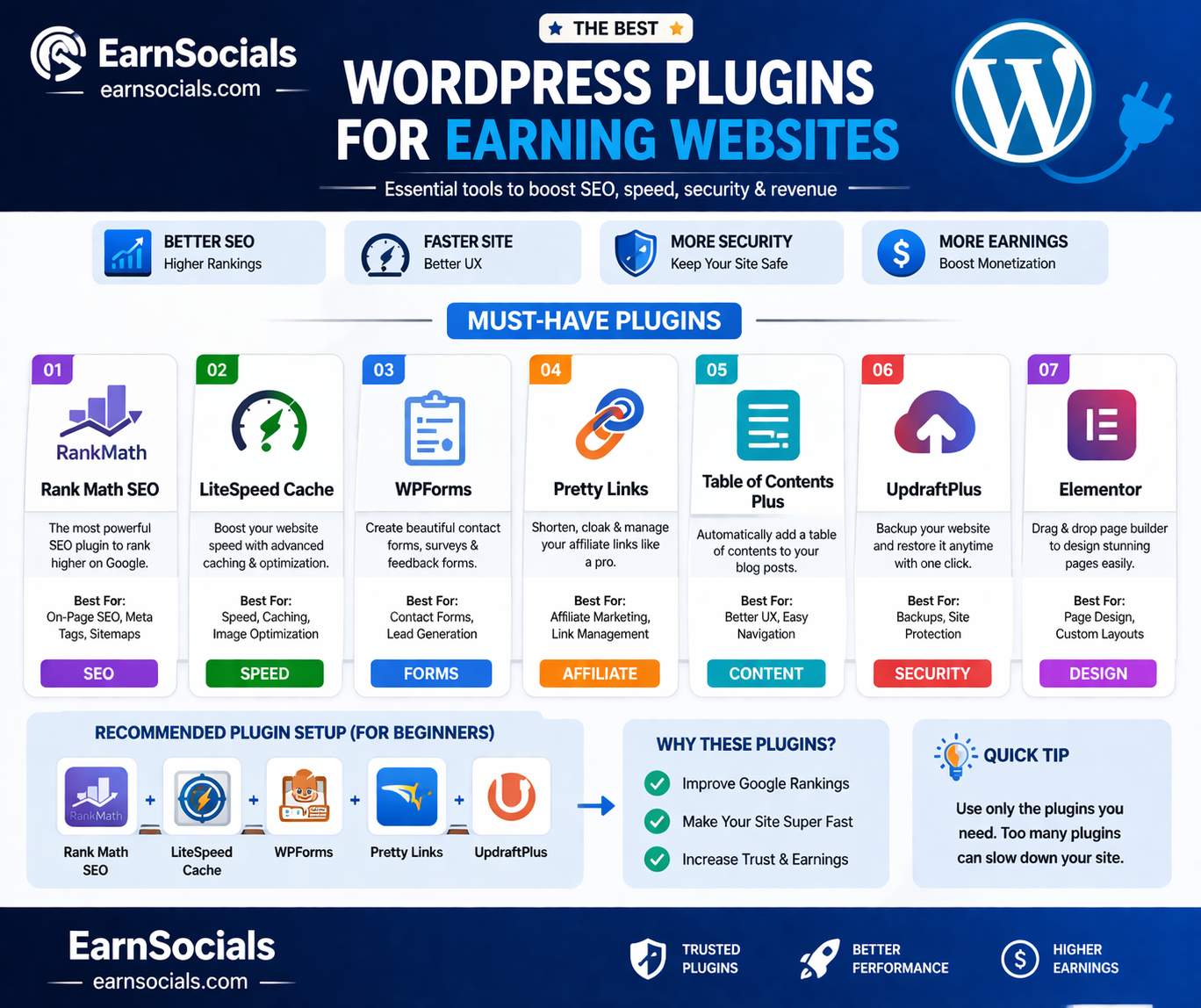
1. Rank Math SEO (Best for SEO)
What it does:
- Helps optimize your content
- Adds meta tags
- Improves Google ranking
Why I recommend it:
👉 Easy to use + powerful features
2. LiteSpeed Cache (Speed Booster)
What it does:
- Improves loading speed
- Enables caching
- Optimizes images
Real Benefit:
👉 Faster site = better SEO + AdSense
3. WPForms (Contact Form)
What it does:
- Creates contact forms
- Helps build trust
👉 Important for AdSense approval
4. Pretty Links (Affiliate Marketing)
What it does:
- Shortens affiliate links
- Makes links clean and professional
👉 Example:yourwebsite.com/go/product
5. Table of Contents Plugin
What it does:
- Adds automatic table of contents
- Improves user experience
👉 Helps users navigate long articles
6. UpdraftPlus (Backup Plugin)
What it does:
- Backup your website
- Restore if something breaks
👉 Essential for safety
7. Elementor (Optional Page Builder)
What it does:
- Helps design pages visually
👉 Use only if needed (can slow site)
Real Example (From Experience)
When I started using:
- Rank Math + LiteSpeed Cache
👉 My website speed improved
👉 Google ranking increased
👉 User experience became better
Best Plugin Combination (Recommended Setup)
👉 For earning blog:
- Rank Math SEO
- LiteSpeed Cache
- WPForms
- Pretty Links
- UpdraftPlus
👉 Simple + powerful setup
Common Mistakes to Avoid
❌ 1. Installing Too Many Plugins
👉 Slows down your site
❌ 2. Using Unknown Plugins
👉 Security risk
❌ 3. Not Updating Plugins
👉 Can break your site
Pro Tips (Important)
✔ Keep Plugins Minimal
Only install what you need
✔ Choose Trusted Plugins
Use plugins with:
- High ratings
- Regular updates
✔ Test Website Speed
After installing plugins
How Plugins Help AdSense Approval
Google checks:
👉 User experience
👉 Website speed
👉 Structure
👉 Plugins help improve all of these
What to Do Next?
After installing plugins:
👉 Next step:
- Optimize your content
- Improve design
- Start publishing articles
Conclusion
Using the right WordPress plugins is essential for building a successful earning website.
👉 Focus on:
- SEO
- Speed
- User experience
👉 Avoid unnecessary tools and keep your site clean. Understand ? flow more Q&A below
Start with the recommended plugins and grow your site step by step.
❓ FAQ (SEO Optimized)
1. Which plugin is best for SEO?
Rank Math SEO is one of the best plugins for optimizing content and improving rankings.
2. How many plugins should I use?
Use only necessary plugins (5–8 maximum) to keep your site fast.
3. Do plugins affect website speed?
Yes, too many plugins can slow down your site.
4. Are free plugins enough?
Yes, most free plugins are enough for beginners.
5. Can plugins help with AdSense approval?
Yes, plugins improve speed, structure, and user experience — all important for AdSense.
